
Purpose-built for ABUS
Intelligent support for a complex reading workflow.
QVCAD receives standard DICOM images, analyzes each Automated Breast Ultrasound study, and presents marked findings alongside the original images for concurrent radiologist review.
AI Detection
Image-processing algorithms and neural networks identify areas that may warrant closer review.
Concurrent Review
CAD output and native ABUS images are displayed together to support interpretation within the reading workflow.
Workflow Efficiency
Viewer functionality is designed to help radiologists navigate volumetric studies efficiently while maintaining diagnostic confidence.
Two integrated subsystems
Analysis and visualization working together.
- CAD subsystem: sophisticated image-processing algorithms analyze ABUS image data.
- Viewer subsystem: native ABUS images and QVCAD output are formatted for concurrent display and review.
QVCAD Navigator
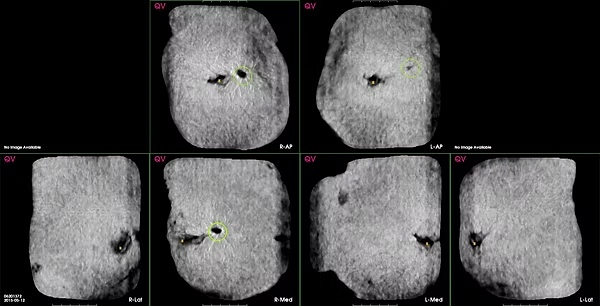
Coronal navigator images summarize study volumes, with green circles highlighting CAD-detected areas of interest.
Hover Mode
Pausing over a navigator location displays the corresponding original coronal and transverse images for rapid localized review.
See QVCAD in your workflow.
Request a demonstration of QVCAD for Automated Breast Ultrasound interpretation.